Showing posts with label OpenGL. Show all posts

Sensory Overload for the Samsung Omnia

SensoryOverload

After fixing up the OpenGL ES wrapper to work with Vincent 3D, porting this game to the Omnia was simply a recompile!

Since the Omnia does not have a "Nav" wheel, click the center button to shoot a bullet, and "swipe" it to use the special spray attack. Just a reminder this isn't meant to be a full featured game, just a demo on how to write 3D games. :)

Sensory Overload CAB file.

Source code to Sensory Overload.

Managed OpenGL ES and the Vincent 3D Implementation

OpenGLEmulator SensoryOverloadEmulator

A few months ago, I wrote a managed wrapper for OpenGL ES. This wrapper worked great on the HTC Touch Diamond, but I never really tested it out on the Vincent 3D OpenGL ES software implementation. This was partly due to my misconception that Vincent 3D was a Common-Lite implementation of OpenGL ES (which would mean it only supports fixed point). As of recently, I've been working with OpenGL ES on a regular basis, and realized that Vincent 3D was in fact a Common implementation (it supports floating point as well as fixed point)!

What this means that the managed wrapper should in fact be fully functional on top of it. However, there was a bug in the wrapper (or maybe Vincent 3D) that prevented it from working properly. So after I addressed it, the wrapper is working fine, for the most part: there seems to be some floating point precision issues with Vincent 3D. I am guessing those may be due to some sort of fixed point conversion taking place in the pipeline, but I am unsure.

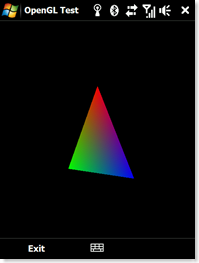
Anyhow, as you can see from the screenshots above, my triangle sample and Sensory Overload are both working on an emulator! Albeit, it is quite slow, and the emulator doesn't have a G-Sensor that allows you to control the ship. :)

Here's the updated Managed OpenGL ES source code.

Sensory Overload

SensoryOverload

A few days ago I published the Managed OpenGL ES wrapper. As a proof of concept, I went so far as to create a simple game for the HTC Touch Diamond that utilizes the G-Sensor, Nav Sensor, and the 3D hardware capabilities of the device. The end result is a simple "Asteroids" type game I call Sensory Overload.

The game is simple:

  • Move the ship by tilting the device.
  • Don't run into an asteroid.
  • Blow up the asteroids into tiny pieces.
  • When an asteroid spawns (it will be faded out), you have 5 seconds to get away from it before it can hurt you.
  • Rotate the Nav sensor clockwise to fire a bullet.
  • Rotate the Nav sensor counter clockwise to fire a spray of bullets. You can only use this special ability once every 5 seconds.
  • Asteroids spawn every 15 seconds.

This is mostly intended as a demo or proof of concept to provide other developers starting ground to create their own amazing games for the HTC Touch Diamond.

Known Bugs:

  • Small asteroids are hard to explode. The bullets travel "through" them between repaints, so they never actually collide. I may fix this in the future.

Click here to download the full source to Sensory Overload.

Click here to download the Sensory Overload CAB file to play the game.

.NET Compact Framework wrapper for OpenGL ES

OpenGL Test

Around a year ago today, I began writing an extensive UI framework for Windows Mobile. It turned out great, however I continually run into the limitations and performance issues of GDI/GDI+ on mobile devices. One of the steps I wanted to take into really improving performance was to utilize the hardware acceleration that we will begin to see in the new wave of Windows Mobile devices; in my case the HTC Touch Diamond.

The first step towards that end is to utilize one of the two 3D APIs available on the Windows Mobile platform. Direct3D Mobile .NET was not a reasonable option: it has limited support and is supposedly being phased out in Windows Mobile 7. In addition, the D3DM implementation on the HTC Touch Diamond is a just a wrapper around OpenGL ES... I find it a little distasteful that than an operating system specific 3D API is actually just a wrapper around a cross platform 3D API, hehe. And on the other hand, OpenGL ES does not have a managed API.

In My Humble Opinion, UI development should generally be in managed code. Although unmanaged code undoubtedly provides superior performance, the developer sacrifices too much of the ease and speed of managed development.

For that reason, I've started work on a managed wrapper for OpenGL ES: I now have a working set of wrappers for OpenGL ES. I won't take all the credit though. Most of the PInvokes were mass imported via the PInvoke Interop Assistant written by Jared Parsons.

The screen shot above is of the sample "Hello World" application written in Managed OpenGL ES. The code download includes the full source for the wrapper and the sample.

For those wanting to learn OpenGL, I highly recommend reading the NeHe OpenGL series. It's the best OpenGL tutorial on the Internet; I've practically had it book marked for 8 years.

Future work will include converting the various OpenGL constants into enums (I.e., GL_TRIANGLES, GL_TEXTURE0, etc) so that arguments are not so loosely typed.

Notes:

  • The sample uses floating point math, so not all devices may support it.
  • If your device does not have an implementation of OpenGL ES (hardware or software), you can get the free software implementation, Vincent 3D. Just drop the libgles_cm.dll into your \Windows directory. Vincent 3D is a fixed point implementation, so it does not support the sample either. I will probably convert the sample to fixed point eventually.