Showing posts with label HTC. Show all posts

Build Configuration for the HTC Magic

MyTouchWhite

A few days ago, I released build scripts that would allow developers to make images that target the T-Mobile MyTouch. I finally got a hold of a regular Magic (a Sapphire 32A) and have created a corresponding project to support building for this device. So, this will now work:

. build/envsetup.sh
lunch htc_magic-eng
make

Please note the instructions regarding cherry-picking certain changes from Donut into your Android repository. The Sapphire 32A uses HTC’s kernel offsets in the boot.img, and not Google’s. Without those changes, your phone will not boot.

Build Configuration for the T-Mobile MyTouch

MyTouchWhite

The HTC Dream is the only supported Android development device. But, it is possible to do development on other devices, by cannibalizing the various drivers that you can find on them. This usually involves modifying/repacking an official update.zip. However, with a little work, it is possible to use the Android build system to create legitimate fastboot images!

After following the instructions to retrieve the MyTouch build configuration and extracting the proprietary bits from a running device, you can do the following to build images for the MyTouch:

. build/envsetup.sh
lunch htc_mytouch-eng
make

There is also a mkupdatezip script available in the Downloads section of the repository to assist in creating update.zip files as well!

The images will then be found in out/target/product/mytouch-open. A build configuration for the Magic will be coming soon! (It is the same board as the MyTouch, a Sapphire, but different enough to need a separate config.)

Note:

The general process in creating this board makefile was basically the following:

  1. Start with the Dream build config (dream-open).
  2. Extract the kernel from a running device and replace it.
  3. Modify the extract-files.sh script to adb pull the correct proprietary files.
  4. Modify the .mk files to reference the proper proprietary files.
  5. Grab the wlan.ko off the device and replace the one at the repository root.

HTC Touch Diamond Stylus Sensor API

StylusSensor

I spent a bit of time figuring out how to determine the stylus on the HTC Touch Diamond. It only took like 5 minutes: it was exactly where I suspected, a registry key that toggled depending on the stylus state. So basically it's really easy to access. I rolled access to this registry key up in the Sensor SDK.

(HKEY_CURRENT_USER\ControlPanel\Keybd\StylusOutStatus for those curious.)

The new HTCStylusSensor has 2 members:

StylusState

This property is has a value that is either StylusIn or StylusOut.

StylusStateChanged

This event fires whenever the StylusState property changes.

Click here if you want to download the APIs and source to access the G-Sensor, Light Sensor, Nav Sensor, or Stylus Sensor.


I will be releasing an tool shortly that allows users to launch any application, shortcut, sound file, etc, when the stylus is removed from the device.

Sensory Overload

SensoryOverload

A few days ago I published the Managed OpenGL ES wrapper. As a proof of concept, I went so far as to create a simple game for the HTC Touch Diamond that utilizes the G-Sensor, Nav Sensor, and the 3D hardware capabilities of the device. The end result is a simple "Asteroids" type game I call Sensory Overload.

The game is simple:

  • Move the ship by tilting the device.
  • Don't run into an asteroid.
  • Blow up the asteroids into tiny pieces.
  • When an asteroid spawns (it will be faded out), you have 5 seconds to get away from it before it can hurt you.
  • Rotate the Nav sensor clockwise to fire a bullet.
  • Rotate the Nav sensor counter clockwise to fire a spray of bullets. You can only use this special ability once every 5 seconds.
  • Asteroids spawn every 15 seconds.

This is mostly intended as a demo or proof of concept to provide other developers starting ground to create their own amazing games for the HTC Touch Diamond.

Known Bugs:

  • Small asteroids are hard to explode. The bullets travel "through" them between repaints, so they never actually collide. I may fix this in the future.

Click here to download the full source to Sensory Overload.

Click here to download the Sensory Overload CAB file to play the game.

.NET Compact Framework wrapper for OpenGL ES

OpenGL Test

Around a year ago today, I began writing an extensive UI framework for Windows Mobile. It turned out great, however I continually run into the limitations and performance issues of GDI/GDI+ on mobile devices. One of the steps I wanted to take into really improving performance was to utilize the hardware acceleration that we will begin to see in the new wave of Windows Mobile devices; in my case the HTC Touch Diamond.

The first step towards that end is to utilize one of the two 3D APIs available on the Windows Mobile platform. Direct3D Mobile .NET was not a reasonable option: it has limited support and is supposedly being phased out in Windows Mobile 7. In addition, the D3DM implementation on the HTC Touch Diamond is a just a wrapper around OpenGL ES... I find it a little distasteful that than an operating system specific 3D API is actually just a wrapper around a cross platform 3D API, hehe. And on the other hand, OpenGL ES does not have a managed API.

In My Humble Opinion, UI development should generally be in managed code. Although unmanaged code undoubtedly provides superior performance, the developer sacrifices too much of the ease and speed of managed development.

For that reason, I've started work on a managed wrapper for OpenGL ES: I now have a working set of wrappers for OpenGL ES. I won't take all the credit though. Most of the PInvokes were mass imported via the PInvoke Interop Assistant written by Jared Parsons.

The screen shot above is of the sample "Hello World" application written in Managed OpenGL ES. The code download includes the full source for the wrapper and the sample.

For those wanting to learn OpenGL, I highly recommend reading the NeHe OpenGL series. It's the best OpenGL tutorial on the Internet; I've practically had it book marked for 8 years.

Future work will include converting the various OpenGL constants into enums (I.e., GL_TRIANGLES, GL_TEXTURE0, etc) so that arguments are not so loosely typed.

Notes:

  • The sample uses floating point math, so not all devices may support it.
  • If your device does not have an implementation of OpenGL ES (hardware or software), you can get the free software implementation, Vincent 3D. Just drop the libgles_cm.dll into your \Windows directory. Vincent 3D is a fixed point implementation, so it does not support the sample either. I will probably convert the sample to fixed point eventually.

Another Klaxon Release

As promised, I implemented more bug fixes and features for this release. Download Klaxon here.

  • The light sensor will only turn off your alarm if the phone is face up. This fixes the issue where the alarm gets shut off if the phones if flipped face down to snooze.
  • If the phone is snoozing, a sensor can not be used to turn the alarm off. The off button must be manually pressed. This is a precaution to ensure the phone doesn't get erroneously turned off.
  • The shake off function is implemented differently now: if at any point, the phone is subject to 20 G's of force, it will turn off. Previously, it was using an orientation change count. The G measurement method is much more reliable.
  • As a silent confirmation, the phone will vibrate once if you put it into Snooze mode. It will Vibrate twice if you turned it off.
  • All the sensor actions are configurable: you can now manually configure what you want the alarm to do when you shake it, flip it, or turn on the light.
  • Implemented some of the UI clean up changes. This includes bigger Vista style check boxes and radio buttons.
  • Implemented an About box which gives you information about your Klaxon version and the author.
  • Fixed a bug where the registry entries were not being deleted properly when an alarm was deleted.
  • Fixed a bug where the device would go to sleep after a Snooze and not wake up to alarm the user.
  • Fixed a bug where the Delay setting was not being saved after editing it.

Klaxon: Windows Mobile G-Sensor and Light Sensor Enabled Alarm Clock

klaxon

I mentioned a post ago that I was working on this. Well it's getting close to completion, and wanted to provide people something to give some feedback on. Right now the finishing touches are in the artwork. Beyond the first screen, the buttons and artwork are really ugly!

You can download Klaxon here.

Using Klaxon is pretty straightforward; it's more or less like the standard Clocks and Alarms application.

G-Sensor Instructions:

  • Flip your phone over to snooze.
  • Shake your phone to turn the alarm off.

Not yet implemented:

  • Artwork (I need to create pretty images to use for buttons)
  • Turn off the alarm if the light comes on in the room (using the Light Sensor!)
  • Turn on the phone light for 15 seconds, so you have a chance to turn off the alarm before it goes off.

Omnipresence Beta 1

Finally had a free weekend to work on Omnipresence again. I got a good amount of stuff done:

  • Panning and Zooming do not suspend screen refreshes.
  • Panning the screen does not tax your bandwidth as much. Tuned the compression algorithms to handle it intelligently.
  • Fixed a bug that cause the the screen to "jump" if you panned or zoomed repeatedly.
  • Implemented right click. Click and hold to send a right click.
  • Gave click events tactile feedback: they now vibrate your phone for a split second. This feature can be enabled and disabled in the menu.
  • Implemented several compression techniques. The "best" one is used every frame. Still investigating further tuning of loss-less compression.

Upcoming Features:

  • One of the unmentioned features is that Omnipresence can support multiple clients/viewers at the same time. I need to add a status panel that shows all the current clients on the server.
  • Password based authentication.
  • "Observer" mode. Someone who connects with the specified observer password can only view the session, and not interact.
  • The ability to toggle how double clicks are handled: send to server or client zoom. Right now double clicks are never sent to the server, and that is annoying!
  • Improve on the tactile feedback, by supporting more types.
    • Audio Notification (a customizable beep)
    • Visual Cue (a cross hair that appears where you clicked)
  • Have the client retrieve "larger" than screen dimension images to support faster panning when bandwidth is not an issue.
  • Implement client pacing: the client should intelligently pace its frame requests so it is never waiting for a frame. It should always be either decoding or receiving a frame.

You can download the latest Omnipresence Beta here. Instructions on how to install and use Omnipresence can be found in the original preview post.

HTC Touch Diamond Nav Sensor API

diamondnav

Scott, from scottandmichelle.net, figured out how to detect which way the nav sensor was being moved. I did some further investigation with the data output and managed to figure the rotation per second readings that were also being returned with it.

The new HTCNavSensor has a single event:

Rotated

This event fires whenever the Nav sensor event is detected. The rotation event will provide the user with an approximate rotation per second value and a radial delta. The radial delta is a double value that describes how much the user has moved along the nav sensor since the last time the event was fired. I.e, a radial delta value of .25 would mean that the user moved his finger around a quarter rotation since the last the last time the nav sensor event fired.

As usual, the updated API can be downloaded here. The other sensor APIs (accelerometer and light sensor) are also available in the same zip file. So that wraps up accessing all the different sensors on the HTC Touch Diamond!

Let me know if you find any bugs!

Edit: I found a bug where the nav sensor was reporting clockwise movement when actually moving clockwise. Fixed that. Also updated the Nav Sensor Test to show a red line that rotates as you rotate around the sensor.

HTC Light Sensor API

lightsensor

Goofed around with the HTCSensorSDK.dll some more and figured out how to access the light sensor. I've updated the HTC Accelerometer API to allow access to the light sensor, and converted the values to make it developer friendly. The API exposes the following:

GetLumens

This returns a double value that describes the environmental lumens. It works decent at best, but it's a starting point. I calibrated this using a lightbulb, monitor, and other random light sources around the house I had the lumens values available for.

Brightness

Retrieves an arbitrary enum that describes the brightness of the environment. Values are Dark, Dim, Normal, and Bright.

BrightnessChanged

This event will notify you whenever the brightness changes.

You can download the API here. Let me know if you find any bugs!

Update:

I've updated the SDK to access the Nav sensor as well!

Using HTC Touch Diamond's Accelerometer/Sensor SDK from Managed Code

When I first got my HTC Touch Diamond a while ago, one of the first things I tried to do was reverse engineer the Sensor API found in HTCSensorSDK.dll. However, anyone who has tried to reverse engineer DLL arguments knows how tedious and painful it can be to create a dummy DLL to intercept valid arguments, parse through assembly, and inspect random memory pointers. Luckily, I did discover a registry key: HKEY_LOCAL_MACHINE\Software\HTC\HTCSensor\GSensor\EventChanged which let me figure out what the general orientation of the device was; and that was good enough for what I was trying to do.

However Scott, from scottandmichelle.net, successfully reverse engineered the HTCSensorSDK.dll. This allows developers to use the g-sensor that is available on the device. Very impressive work on the part of Scott!

Anyhow, I spent a portion of today writing a managed wrapper for HTC's Sensor API. You can download it here. The code also includes a sample Teeter-esque type application which allows you to roll a ball around the screen.

The managed API contains the IGSensor interface which allows you to hook to query the state of the g-sensor on the device. You can create it using the GSensorFactory.CreateGSensor method. It exposes the following methods, properties, and events:

GetGVector

Returns a vector that desribes the direction of gravity/acceleration in relation to the device screen.
When the device is face up on a flat surface, this method would return 0, 0, -9.8.
The Z value of -9.8 would mean that the acceleration in the opposite direction of the orientation of the screen.
When the device is held standing up, this method would return 0, -9.8, 0.
The Y value of -9.8 would mean that the device is accelerating in the direction of the bottom of the screen.
Conversely, if the device is held upside down, this method would return 0, 9.8, 0.
The vector returned will have a length measured in the unit meters per second square.
Ideally the when the device is in a motionless state, the vector would be of length 9.8 (the gravitational constant). However, the sensor is not extremely accurate, so this almost never the case.
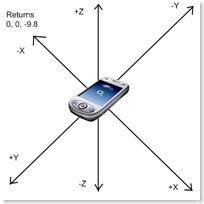
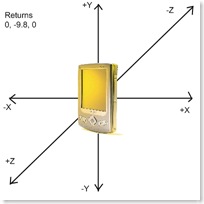
faceup portrait

Orientation

Retrieves the current orientation of the device, returning one of the following enums: Landscape, ReverseLandscape, Portrait, ReversePortrait, FaceDown, FaceUp.

OrientationChanged

This event fires whenever the device's orientation changes.

Enjoy, and let me know if you find any bugs!


Update:

I have updated the SDK to include the Nav Sensor and the Light Sensor. All the sensors are now accessible!

Update #2:

The GSensor API now supports the Samsung Instinct/Omnia!